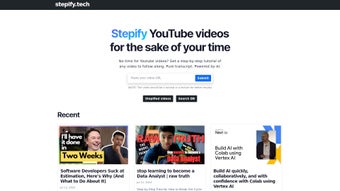

Download Stepify – AI‑Powered YouTube to Tutorial Converter, Free & Secure
Overview of Stepify
Stepify is an AI‑powered tool that transforms YouTube videos into clear, step‑by‑step tutorials. By leveraging advanced natural‑language processing and computer‑vision algorithms, the platform automatically generates accurate transcriptions, extracts key actions, and organizes them into concise, numbered steps. Whether you are an entrepreneur hunting for business insights, a developer looking for code walkthroughs, a home‑cook following a recipe, or a personal‑development enthusiast seeking habit‑building advice, Stepify turns long‑form video content into digestible learning modules.
This eliminates the need to constantly replay video segments, allowing users to learn at their own pace and reference specific steps without scrolling through minutes of footage. The service covers a broad spectrum of categories—tech, finance, cooking, fitness, arts, and more—making it a versatile companion for lifelong learners. In addition, Stepify’s AI engine continuously updates its language models, ensuring that transcriptions stay up‑to‑date with new slang, technical jargon, and regional accents.
The result is a secure, fast, and reliable solution that empowers anyone to convert visual knowledge into actionable, written guides. Stepify also respects user privacy; all data is processed in encrypted tunnels and never sold to third parties, giving peace of mind to professionals and students alike.
Key Features That Set Stepify Apart
Stepify’s feature set is built around the principle of making video‑based learning as effortless as reading a well‑structured article. Each capability has been fine‑tuned to address common pain points such as inaccurate captions, time‑consuming note‑taking, and difficulty locating specific moments in a video. Below is a detailed look at the most impactful functionalities:
- Automatic Transcription: High‑accuracy speech‑to‑text conversion in over 30 languages, with speaker‑diarization that labels each participant when multiple voices are present.
- Step Extraction Engine: AI identifies actionable moments, isolates commands, and formats them into numbered steps, preserving logical flow and dependencies.
- Multi‑Category Support: Works equally well for tech tutorials, cooking demos, fitness routines, and soft‑skill talks, automatically adapting the step style to the content type.
- Searchable Knowledge Base: Users can query specific steps or keywords across all generated tutorials, thanks to an indexed database that returns results in milliseconds.
- Offline Export: Export tutorials as PDF, Markdown, or plain text for offline study, ensuring you stay productive without an internet connection.
- Customizable Formatting: Choose bullet, numbered, or checklist styles to match personal study habits, and add custom icons for visual emphasis.
- Integration with Learning Platforms: Directly import tutorials into Notion, Evernote, Google Docs, or Microsoft OneNote, streamlining workflow integration.
- Secure Cloud Storage: All processed data is encrypted in transit (TLS 1.3) and at rest (AES‑256), complying with GDPR, CCPA, and ISO‑27001 standards.
- Regular AI Updates: Monthly model improvements keep transcription accuracy high and add support for emerging slang and industry‑specific terminology.
- Free Tier & Premium Options: Generate up to 10 tutorials per month for free; paid plans unlock unlimited conversions, priority processing, and advanced collaboration tools.
Beyond these core features, Stepify offers an extensible API for developers who want to embed tutorial generation into custom applications, as well as a community forum where power users share templates and best‑practice workflows. This ecosystem makes Stepify not just a tool but a growing platform for knowledge automation.
Installation & Usage Instructions
Stepify is delivered as a web‑based SaaS platform, meaning there is no heavy client‑side installation required. Follow these simple steps to get started and make the most of the tool’s capabilities:
- Create an Account: Visit stepify.com and sign up using an email address or Google OAuth. Verification is completed within seconds, and a welcome tour guides you through the dashboard.
- Choose a Plan: The free tier allows up to ten tutorial conversions per month. For power users, select the “Pro” or “Enterprise” plan via the dashboard; payment is processed securely through Stripe, and you receive a receipt for accounting purposes.
- Paste a YouTube URL: On the main dashboard, locate the “Convert Video” field. Copy the YouTube video link you wish to transform and paste it into the input box. The system validates the link and alerts you if the video is private or age‑restricted.
- Configure Output Options: Choose the desired output format (PDF, Markdown, or plain text) and step style (numbered, checklist, or bullet). You can also enable “Include timestamps” for quick navigation, and select a language for transcription if the video is multilingual.
- Start the Conversion: Click “Generate Tutorial.” Stepify’s backend AI queues the video, extracts audio, runs transcription, and builds the step list. Processing time varies with video length—most videos under 20 minutes finish within 60 seconds, while longer lectures may take up to 3 minutes.
- Review & Edit: The generated tutorial appears in an editor where you can manually tweak wording, reorder steps, add personal notes, or insert images captured from the video. Changes are saved automatically to your cloud workspace, and version history lets you revert if needed.
- Export or Share: Once satisfied, click “Export” to download the file or “Share” to generate a public link. You may also push the tutorial directly to integrated apps like Notion via the “Connect” button, or embed it on a website using an iframe snippet.
- Manage History: All past conversions are stored in the “My Tutorials” section. Use filters to locate tutorials by topic, date, or format, and delete any items you no longer need to free up storage.
For mobile users, Stepify offers native Android and iOS apps that mirror the web workflow. After installing the app from Google Play or the Apple App Store, log in with the same credentials and enjoy on‑the‑go conversions. The apps also support offline caching of previously generated tutorials, ensuring you can study without an internet connection. Additionally, the mobile interface includes a voice‑command feature that lets you start a conversion by speaking “Convert this video,” which is especially handy when you’re away from a keyboard.
Compatibility, System Requirements & Pros/Cons
Stepify is platform‑agnostic. Because it runs primarily in the cloud, it works on any modern web browser—Chrome, Firefox, Edge, Safari, or Opera—on Windows 10/11, macOS 12+, Linux, as well as on Android 8+ and iOS 13+. The dedicated mobile apps are optimized for ARM‑based devices and support both tablets and smartphones. Minimum system requirements are modest: a recent processor, 2 GB of RAM, and a stable broadband connection (minimum 5 Mbps) for optimal performance.
Pros
- Fast, AI‑driven conversion eliminates manual note‑taking.
- Supports a wide range of content categories, making it useful for diverse learners.
- Secure cloud processing with GDPR, CCPA, and ISO‑27001 compliance.
- Free tier provides genuine value for casual users and students.
- Seamless integration with popular productivity tools like Notion, Evernote, and Google Workspace.
- Customizable export formats (PDF, Markdown, plain text) for offline access.
- Regular AI model updates keep the service current with language trends.
Cons
- Heavy reliance on internet connectivity; offline conversion is not possible.
- Premium plans can become pricey for teams requiring many conversions.
- Transcription accuracy may dip with heavily accented speakers or low‑quality audio.
- Limited customization for video‑specific visual cues (e.g., on‑screen annotations).
- Maximum upload size of 500 MB for non‑YouTube videos may restrict large presentations.
Frequently Asked Questions (FAQ) & Conclusion
How accurate are Stepify’s transcriptions?
Stepify uses state‑of‑the‑art speech‑to‑text models that achieve ≈ 96 % accuracy on clear audio. Accuracy may drop with background noise, strong accents, or low‑bitrate videos, but the platform allows manual correction before final export.
Can I convert videos that are not on YouTube?
Currently Stepify only accepts public YouTube URLs. However, you can upload a local video file (up to 500 MB) via the “Upload” tab on the dashboard, and the same AI engine will process it.
Is there a limit to how many tutorials I can store?
Free accounts can store up to 50 tutorials. Paid plans offer unlimited storage and also include version history for each tutorial.
Do I need technical knowledge to use Stepify?
No. The interface is designed for non‑technical users. All AI processes run in the background, and the step editor uses a simple drag‑and‑drop layout.
How does Stepify protect my data?
All data transfers are encrypted with TLS 1.3. At rest, tutorials are stored in encrypted S3 buckets, and access is controlled via OAuth 2.0. The company follows GDPR and CCPA guidelines.
Conclusion & Call to Action
Stepify bridges the gap between passive video consumption and active knowledge retention. By converting YouTube content into step‑by‑step tutorials, it empowers learners to absorb information quickly, reference exact actions, and integrate new skills into daily workflows. Whether you’re a student, a professional upskilling, or a hobbyist craving organized instructions, Stepify delivers a secure, AI‑driven experience that saves time and reduces cognitive overload. Ready to transform the way you learn from video? Download Stepify today, start with the free tier, and discover how effortless tutorial creation can be.
Pros: Fast AI conversion, multi‑category support, strong security, extensive integrations.
Cons: Requires internet, premium cost for heavy users, limited visual cue customization.



.png)



